🏠
Back









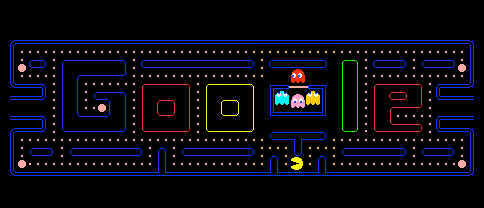

Play Google's historic interactive Pacman doodle! Eat dots in the custom GOOGLE logo maze, avoid ghosts, and press 'Insert Coin' for 2-player co-op!
Originally released on May 21, 2010, the Google Pacman Doodle was designed to commemorate the 30th anniversary of Bandai Namco's legendary arcade classic. It stands as a milestone in web history, being Google's very first fully playable interactive logo doodle. The board is beautifully constructed to form the letters "GOOGLE" out of the maze walls, providing a nostalgic challenge.
Our arcade gaming specialists highly recommend this edition for retro gamers. It features authentic 8-bit sound effects, accurate ghost logic algorithms, and the original graphic assets. The game also includes the unique "Insert Coin" button, which, when clicked twice, spawns Ms. Pac-Man on the board for a two-player cooperative game.
Use the Arrow keys on your keyboard (or swipe directly on touch screens) to direct Pacman. Gobble up all the yellow dots scattered in the corridors.
Dodge the four classic ghosts Blinky, Pinky, Inky, and Clyde. Getting caught costs you a life, so watch their movement patterns closely.
Eat the large, blinking power pellets located in the corners. This temporarily turns the ghosts blue and vulnerable, allowing you to eat them for bonus points.
The letters 'G' and 'E' in the Google maze form tight, enclosed dead-ends. Clean out these dots first when the ghosts are fresh out of the spawner, so you don't get cornered later.
Each ghost behaves differently: Blinky (red) pursues Pac-Man directly, Pinky (pink) targets the spaces in front of Pac-Man, Inky (blue) uses complex position formulas, and Clyde (orange) wanders off to the bottom-left corner.
Press 'Insert Coin' twice to summon Ms. Pac-Man. Player 1 uses the keyboard arrow keys, while Player 2 controls Ms. Pac-Man using the WASD keys, making it a fun local cooperative game.
| Supported Devices | Chromebook, PC, Mac, iPad, iPhone, Android smartphones |
| Game Modes | Single-Player (Pac-man) & Two-Player Local Co-op (adds Ms. Pac-man) |
| Primary Controls | Arrow keys (Pacman) & WASD keys (Ms. Pacman) |
| Audio Design | Authentic retro arcade music and siren sound effects |
Once your lives are depleted, the maze ends and your score is tallied. You can press the 'Insert Coin' button to restart the maze and try again.
Wait for the game iframe to initialize, then press the 'Insert Coin' button twice. Ms. Pac-Man will spawn alongside Pac-Man on the board, controlled via the WASD keys.
The 30th anniversary Google doodle keeps the strict arcade gameplay rules and does not feature a pause button. Plan to play through the maze without interruptions.